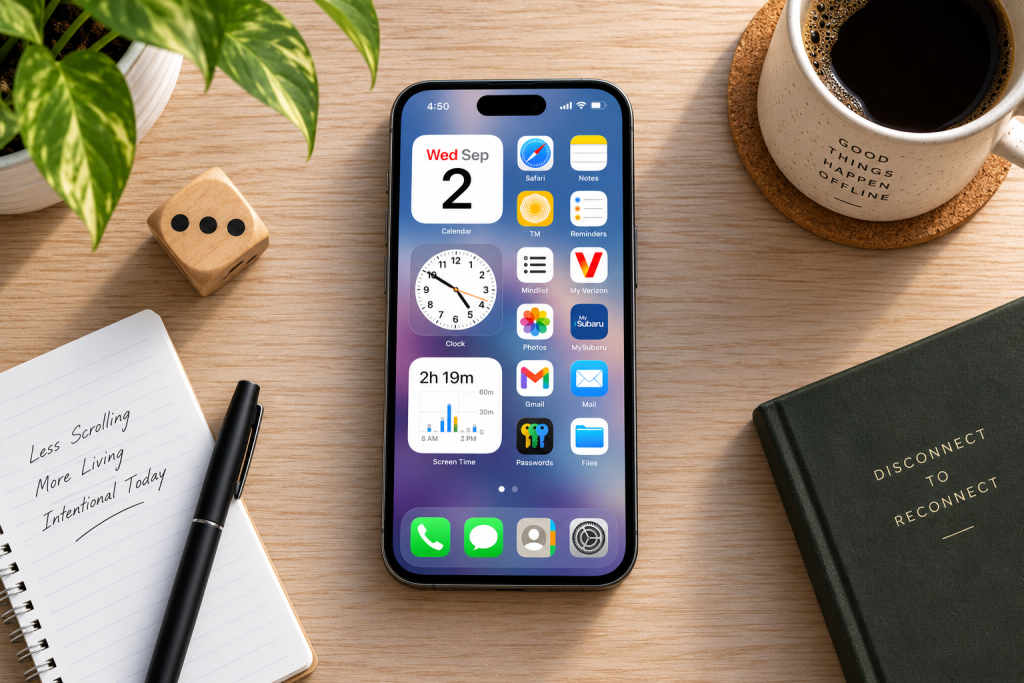
I’ll be the first to admit it: I have a problem with my phone.
And I think a lot of us do.
Our phones have become extensions of us. They’re with us when we’re alone, when we’re running errands, when we’re eating, and even when we’re spending time with friends and family.
There’s obviously a good side to that. These little devices allow us to communicate with people, get directions, order groceries, take notes, check the weather, manage our money, and do a hundred other useful things.
The problem is that we can’t seem to put them down.
“I’m just going to check social media for ten minutes.”
Two hours later…
Where did the time go?
I’ve done it. I’ve also been sitting with friends while every one of us was looking at our phones instead of talking to each other.
Eventually, I realized I didn’t want to spend so much of my life staring at a little screen and getting sucked into endless rabbit holes.
I’ve written before about why I’m reclaiming my attention, and my phone was one of the biggest places I knew I needed to make a change.
But I also didn’t necessarily want a minimalist phone either.
I wanted a phone that works for me, and doesn’t control me.
I Tried the Minimalist Phone Thing
I’ve experimented with apps designed to turn your smartphone into something closer to a minimalist “dumb phone.”
They just aren’t for me.
Some of them take minimalism too far for my taste. I don’t necessarily want a blank Home Screen with four text-based buttons. I still want my wallpaper. I still want some personality. I still want my Smartphone to feel like my Smartphone.
I’ve also found some of these minimalist apps clunky, and many require yet another subscription.
And if you’re anything like me, you’re probably getting pretty tired of subscriptions.
So I decided to take a different approach.
Instead of trying to turn my smartphone into a dumb phone, I decided to make the smartphone I already owned more intentional.
My goal wasn’t to create a phone that could barely do anything.
My goal was to create a phone where every app had a purpose.
at one point, I had more than 300 apps.
Yes.
Three hundred.
That’s a lot of apps.
The funny thing is, my phone didn’t necessarily look like a disaster. I’ve always been pretty particular about keeping my apps organized.
But underneath all that organization were hundreds of them.
Shopping apps. Streaming apps. Games. Design apps. Social media. And plenty of apps I barely even opened.
Then there were the notifications.
Lots and lots of notifications.
Some apps I rarely used were still allowed to interrupt me throughout the day.
That’s when I realized something:
A phone can look organized without actually being intentional.
I wanted to spend less time on my phone and more time engaged with my actual life. I wanted fewer interruptions, less scrolling, better focus, and fewer moments where I picked up my phone for one thing and somehow ended up doing five others.
I also noticed something incredibly simple:
The less time I spent on my phone, the better I felt.
So I started deleting.
Minimal Doesn’t Mean Having Five Apps
This is probably the most important thing I want to make clear.
I’m not trying to see how few apps I can possibly survive with.
That’s not the point.
My phone still has plenty of apps.
The goal is to keep the apps that genuinely serve a purpose in your life and remove the ones that constantly compete for your attention.
There are apps on my phone that I might not open very often.
Food apps are a good example. Maybe I only open one when I want to order something.
Ride share apps are another.
I don’t see a problem with keeping those because I’m not randomly opening a ride share app twenty times a day to see what’s new. I open it because I need a ride, use it, and close it.
That’s intentional.
For me, the things I really want to do on my phone are pretty simple: make calls, send messages, order food, drinks and groceries, check the weather, write down notes, check email, navigate somewhere, and manage things like my bank account.
Your list will probably be different.
And it should be.
What My Intentional Phone Actually Looks Like
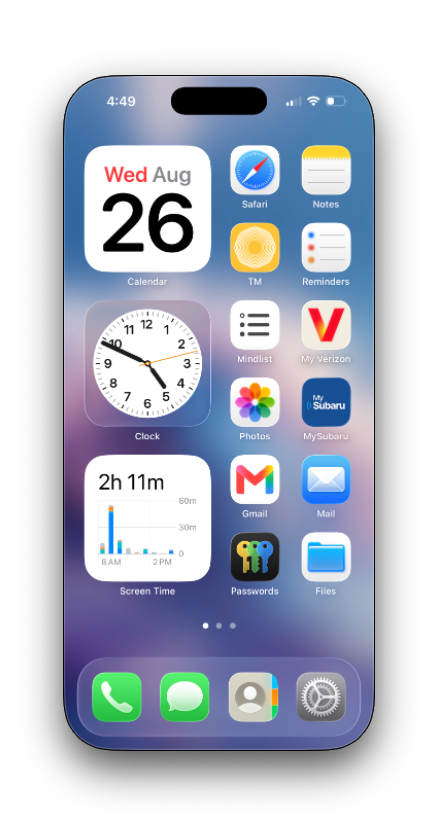
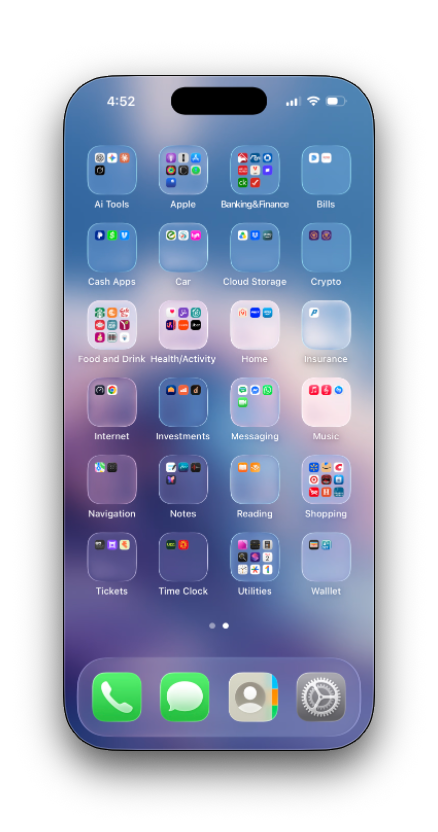
My current phone setup. My main page keeps the things I regularly use easily accessible, while everything else is organized into folders on the second page.
My first page contains the apps and information I regularly need. I have things like Calendar, Safari, Notes, Reminders, Clock, Photos, email, Passwords, and Files.
I also keep a Screen Time widget right on the Home Screen. I like being able to see how much time I’m actually spending on my phone.
The second page is different.
That’s where I keep most of the apps that serve a purpose but don’t need to be staring me in the face all day.
Banking and finance. Bills. Food and drink. Navigation. Shopping. Utilities. Tickets. Cloud storage. Notes. Health and activity.
They’re still there when I need them.
They just have a place.
And you’ll probably notice what isn’t sitting on either page:
Social media.
Streaming services.
Games.
Those were some of the biggest sources of distraction for me, so they no longer need to live on the device that’s in my pocket all day.
Your Phone Doesn’t Have to Look Like Mine
I use an iPhone, so the screenshots in this guide are from an iPhone.
But this isn’t really an iPhone guide.
If you use Android, you can do the same thing.
The exact menus, folder system, and notification settings may differ depending on your phone, but the philosophy doesn’t change:
Keep what serves you. Remove what distracts you. Organize what remains.
Your finished phone doesn’t have to look anything like mine.
You might use completely different apps. You might prefer more folders. You might prefer fewer. You might use widgets everywhere or none at all.
This isn’t about copying my Home Screen.
It’s about figuring out what your phone is for.
How to Build Your Own Intentional Phone
So how do you actually do this?
Here’s the process I used.
Step 1: Write Down Your Apps
Grab an actual piece of paper and write down the apps you have installed.
Yes, paper.
I personally like writing things down because seeing everything in front of me gives me a much better picture of what I actually have.
Don’t worry about organizing the list perfectly. Just start writing.
Once you have your apps on paper, go through them one by one and ask yourself:
When was the last time I used this?
Do I really need this?
Does this make my life easier?
Does it distract me?
Could I access this another way if I needed it?
You can also look at Screen Time on iPhone or the equivalent digital-wellbeing tools on Android to see which apps are actually consuming your time.
If there are a few apps eating up hours of your week, that’s a good place to start.
Put a checkmark next to the apps that don’t serve you.
Step 2: Delete What Doesn’t Belong
Now start deleting.
But remember:
Removing something from your phone doesn’t necessarily mean removing it from your life.
That was a big realization for me.
I still enjoy entertainment. I still use social media. I still occasionally play a video game.
I just don’t need all of those things available in my pocket 24/7.
If I want to watch television, I have an actual television.
If I want to work on a design, I have a computer and an iPad.
If I want to play a game, I can do it somewhere else.
And if I want to check social media, I can do that from my computer.
Sometimes digital minimalism isn’t about giving something up.
It’s about giving it a proper place.
Step 3: Organize What You Keep
Once you’ve removed the apps that don’t belong, organize what remains.
I keep my most-used apps easily accessible on my first page and organize most of everything else into folders on my second.
And this is where I think people sometimes misunderstand minimalism.
Take my Shopping folder.
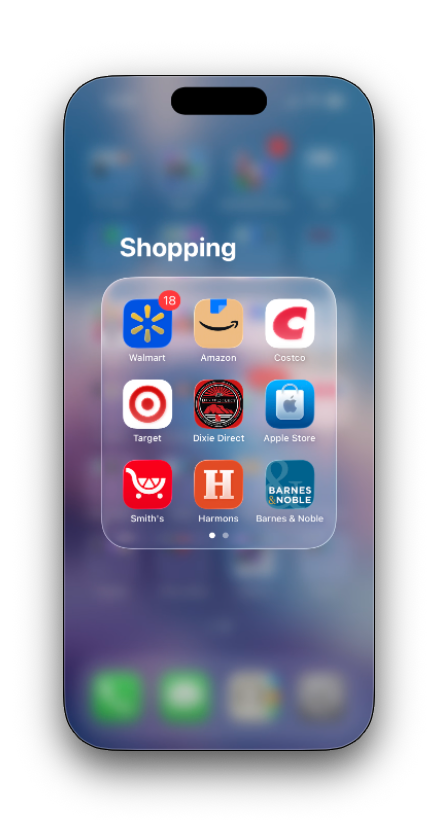
Some apps don’t need to be used every day to deserve a place on my phone. They just need a purpose.
There are several apps in there.
Walmart. Amazon. Costco. Target. Smith’s. Barnes & Noble, and others.
Could I delete most of those and technically have a “more minimalist” phone?
Sure.
But why?
I use Walmart for things like grocery pickup. I might open Amazon when I actually need to order something. The other store apps are there when I have a reason to use them.
The important part is that I’m not mindlessly opening these apps throughout the day.
They have a job.
I open them when I need them, do what I came there to do, and leave.
There’s a difference between an app taking up storage on your phone and an app constantly taking up your attention.
For me, attention is the thing I’m trying to protect.
Step 4: Remove the Noise
Now go through the apps you decided to keep and look at your notifications.
Ask yourself:
Does this app actually need permission to interrupt me?
Some absolutely do.
Calls and messages matter to me. Certain email and banking notifications can be useful. If I’m waiting for a grocery pickup order, I obviously want the app to tell me when it’s ready.
But does every app need to buzz, light up my screen, or display a badge?
No.
I don’t turn off every notification or every badge. I turn off the ones that don’t deserve my attention.
Your choices will probably be different from mine, and that’s completely fine.
Whether you use iPhone or Android, go through your notification settings and decide which apps are actually important enough to interrupt you.
Don’t ask:
Could this notification possibly be useful?
Ask:
Is this important enough to take my attention away from whatever I’m doing?
That’s a much different standard.
What I Removed From My Phone
For me, four categories stood out.
Social Media
This was the big one.
Social media was probably the biggest thief of my attention.
You know how it goes.
You open something intending to check it for a few minutes. Then you go from post to post, video to video, comment to comment.
Depending on the rabbit hole you go down, you might walk away feeling worse than when you started.
Politics. Arguments. Negative comments. Likes. Engagement. News.
It’s a lot of noise to carry around in your pocket.
I still use social media, but now I treat it more like I did back in the Myspace days.
I come home, sit down at my computer, spend maybe 10 or 20 minutes catching up, and then I’m done.
I don’t need access to it every minute of every day.
Streaming Apps
My streaming apps went too.
If I want to watch a television show or movie, I’d rather sit down and actually watch it on my TV.
I don’t need an entire entertainment center living in my pocket.
Games
I love Tetris.
Seriously.
I love Tetris.
But spending hours hunched over a tiny phone playing it wasn’t doing my head or neck any favors.
So Tetris and the rest of my games came off my phone.
If I want my Tetris fix, I can play it on my tablet with a controller.
I didn’t eliminate something I enjoy.
I gave it another place.
Design Apps
This one was surprisingly difficult because I’m a graphic designer.
But when I really thought about it, I rarely did serious design work on my phone.
And I’d much rather design on my computer or iPad anyway.
So many of those apps went too.
This process taught me that just because an app relates to something important to me doesn’t mean I need it installed on every device I own.
Every App on My Phone Works for Me
This is probably the best way I can describe my phone now:
Every app on my phone works for me. I don’t work for it.
Some apps I use every day.
Some I use once in a while.
But they all have a reason for being there.
My phone still looks like my phone. It isn’t a blank slab with four buttons. It still has my wallpaper. It still has some personality.
It’s still a smartphone.
It just has fewer ways to pull me away from the things I’d rather be doing.
What I’ve Noticed So Far
It’s only been a few months since I cleaned up and decluttered my phone, so I’m still seeing how this experiment affects me.
But I’ve already noticed some changes.
Less Phone Clutter
There simply isn’t as much stuff begging to be opened.
I’ve learned that checking one thing can easily lead to checking another.
One app becomes two. Two becomes five.
An hour later, you’re wondering what you originally picked up your phone to do.
Having fewer distractions available makes that rabbit hole harder to fall into in the first place.
Better Focus
Constantly checking my phone and bouncing between apps fragments my attention.
When I’m not doing that all day, it’s easier to focus on something that actually matters.
I feel more productive and more engaged with whatever is in front of me.
Less Stress
I don’t need to spend my entire day wondering whether somebody liked something I posted.
I don’t need to read every comment.
I don’t need every breaking-news notification.
And I definitely don’t need an endless stream of people arguing with each other sitting in my pocket.
That doesn’t mean I’m ignoring what’s happening in the world.
It means I don’t need to consume it every waking minute.
Better Relationships
This one matters to me.
When I’m spending time with family or friends, I make an effort to keep my phone in my pocket or completely out of reach.
If I’m spending time with somebody I care about, I want to actually be there.
I’ve been in those situations where everyone is physically together, but everyone is staring at their own phone.
I don’t want that anymore.
More Time
This might be the biggest one.
Ten minutes doesn’t seem like much.
Neither does watching a couple of short videos.
But those minutes add up.
We’ve probably all had that moment where we finally look at the clock and think:
Where did the last two hours go?
There are things I’d rather give that time to.
Walking.
Writing.
Creating.
Talking to someone.
Watching a movie intentionally.
Or sometimes just doing absolutely nothing.
This Isn’t About Hating Technology
I love technology.
That’s exactly why I don’t want it controlling my attention.
My phone is an incredible tool, and I don’t plan on getting rid of it.
I simply want to decide when and why I use it.
That’s what an intentional phone means to me.
Not the fewest apps.
Not a boring Home Screen.
Not throwing your smartphone in the trash and buying a flip phone.
It’s having a device where the things you keep serve you instead of constantly asking you to serve them.
Your intentional phone probably won’t look exactly like mine.
It shouldn’t.
Figure out what matters to you. Keep the apps that genuinely make your life easier. Remove the ones that constantly steal your attention. Turn off the notifications that don’t deserve to interrupt you.
And then comes the most important part.
Put the phone down.
Because decluttering your phone isn’t really about your phone.
It’s about what happens when you aren’t looking at it.
Go for a walk. Talk to someone you love. Make dinner. Read something. Work on that thing you’ve been putting off. Sit outside. Look around.
Or just enjoy a few minutes where absolutely nothing is demanding your attention.
Disconnect from the things that don’t matter, so you can reconnect with the things that do.
Comments are currently disabled.
Disconnect to Reconnect is about spending less time online and more time enjoying life beyond the screen. While comments are disabled, I encourage you to take what resonates with you, step away from your device, and reconnect with what matters most.